Many small businesses keep using the same website for years simply because it still works. The pages open, the contact form is there, and the site still appears in search. But a functioning website is not always an effective one. Visitors may still struggle to understand what the business does, find useful information, trust what they see, or work out what to do next. At the same time, a website should not be rebuilt just because it has been online for a few years. Age by itself is not a good reason to replace a site that is still performing well.
In this blog, we will look at seven clear signs that may show your small business website redesign is worth considering and explain what each one means for usability, conversions, and future growth. We will also look at when a simple refresh may be enough, how to protect SEO during a redesign, and what to measure once the new website is live.
Before Redesigning, Ask Whether the Website Still Supports the Business
A redesign should fix a real problem, not just make the site look newer. Before changing layouts, colors, or technology, it is worth asking whether the current website still supports the way the business operates today.
Consider a redesign if your website has poor usability, weak conversion, out-of-date messaging, difficult maintenance, technical limitations, or a structure that doesn’t fit the services you’re providing. Those are stronger reasons than simply wanting a fresh design.
1. When a Small Update May Be Enough
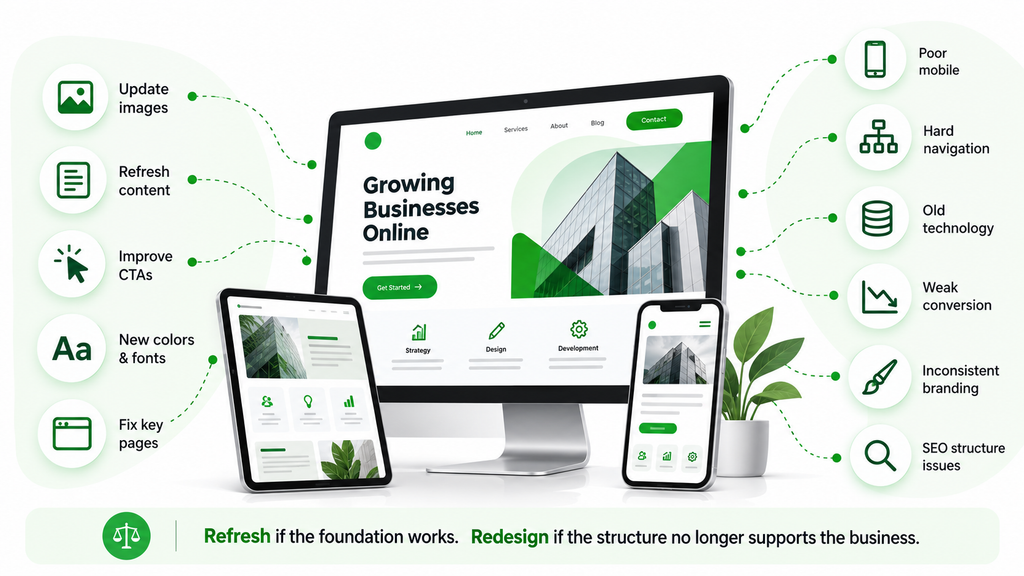
Not every old website needs a total makeover. If the structure, tech, and navigation are still functioning well, a smaller update could solve the problem without the cost and disruption of a full redesign.
A refresh may be enough when the main issues involve:
- Updating images: Replacing old photography or graphics can make the website feel more current without changing its structure.
- Rewriting outdated content: Pages may only need clearer messaging, updated service details, or stronger examples.
- Improving CTAs: Better calls to action can make it easier for visitors to understand what to do next.
- Refreshing colors or typography: Small visual changes can modernize the site without rebuilding it.
- Fixing individual pages: A few weak pages may need attention while the rest of the website continues to work well.
If the foundation is still solid, these smaller changes can often make a noticeable difference, without the project becoming a complete rebuild.
2. When a Full Redesign Makes More Sense
A broader business website redesign makes more sense when several parts of the site are no longer working well together.
Common signs include:
- Poor mobile performance
- Difficult navigation
- Outdated technology
- Weak conversion paths
- Old or inconsistent branding
- Structural SEO problems
When these problems come along together, fixing them one by one can get costly and frustrating. In that situation, a full redesign can give the business a cleaner foundation instead of continuing to patch a system that is no longer doing its job properly.
Not every outdated-looking website needs a complete overhaul, but certain problems can quietly affect your credibility, user experience, and business growth, so here are the 7 signs:
These signs can help you understand whether your current website is still supporting your small business or starting to hold it back. Issues such as an outdated design, slow loading speed, poor mobile usability, confusing navigation, or declining conversions may indicate that simple updates are no longer enough. Recognizing these problems early can help you decide whether a website redesign is a worthwhile investment and what areas deserve the most attention.
Sign 1 – Your Website No Longer Reflects the Quality of Your Business
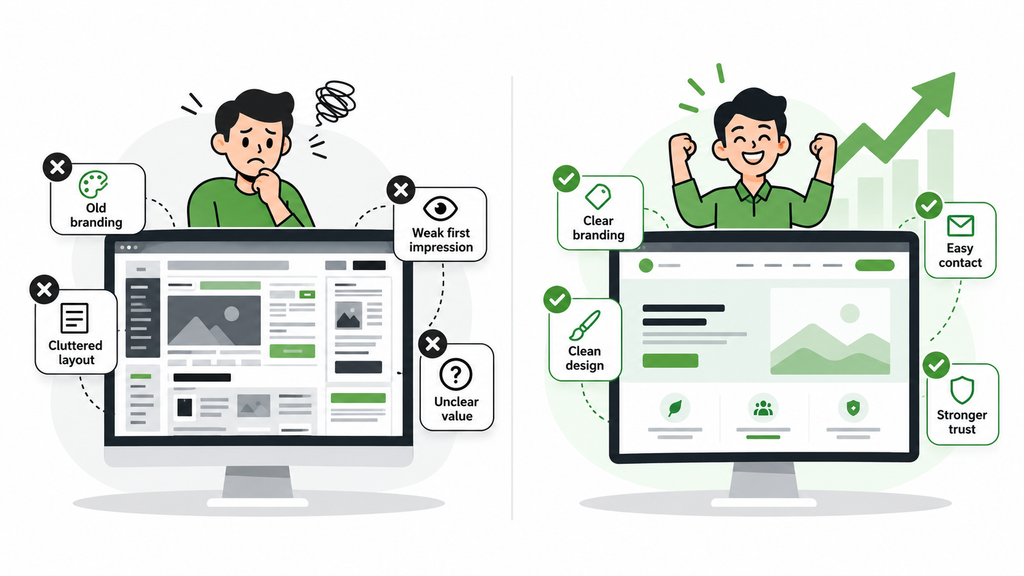
A website often creates the first impression of a business before anyone speaks to the team, visits the office, or sees the quality of the work firsthand. The real problem with an outdated business website is not simply that it looks old. It becomes an issue when the website gives a weaker impression than the business itself deserves.
- Your brand has changed, but the website has not: Businesses change over time. Logos are updated, messaging becomes more focused, services expand, target customers shift, and the company may become far more established than it was when the website was first built. If the website still reflects an older version of the business, visitors may get the wrong idea about what the company does or who it serves. A redesign can bring the website back in line with current branding, positioning, and priorities so the online experience feels consistent with the business people deal with offline.
- The Design Feels Cluttered or Inconsistent: Websites often become cluttered slowly. New sections are added, different designers make changes, buttons use different styles, fonts vary, and page layouts stop following the same pattern. Individually, each problem may be small, but together they can make the site seem less polished and harder to scan. Good small business web design should make information easier to digest. A cleaner visual system keeps visitors focused on the message and not distracted by inconsistent layouts.
- Your Website Creates the Wrong First Impression: A company may provide excellent service but still lose trust if the website looks neglected, confusing, or hard to use. People often make quick judgments. If the site feels abandoned, visitors may start wondering whether the contact details are still correct, whether the company is active, or whether the service itself will feel just as outdated. The website does not need to be flashy. It simply needs to feel current, clear, credible, and right for the business.
- Competitors Communicate Their Value More Clearly: Competitor websites can be useful when you want to understand what customers may be comparing. If the service quality is the same, other businesses can look more convincing if they have clearer descriptions of their services, stronger proofs, easier navigation, and easier ways to contact them. The goal is not to copy competitors. It is to notice whether your own website explains your value clearly enough.
Sign 2 – Your Website Is Difficult to Use on Mobile Devices
Many people first visit a business website on a smartphone. They may be looking for a phone number, checking services, filling in a form, comparing prices, or trying to find directions. A poor mobile website experience creates friction before visitors have even had the chance to understand the offer.
- Visitors Need to Zoom or Scroll Sideways: A website that forces users to pinch, zoom, or scroll sideways just to read the page is immediately harder to use. Pages should adapt naturally to smaller screens. Text should be legible, images should be scaled correctly, and important information should not be lost in the layout. These may sound like basic requirements, but older sites can still struggle with them.
- Buttons and Menus Are Difficult to Use: Navigation that works well with a mouse may not work well with a thumb. Simple tasks get frustrating with tiny buttons, cramped menus, overlapping components, or links that are too close to each other. If someone has to tap repeatedly just to open a menu or choose a service, they may leave instead.
- Forms Are Hard to Complete on a Phone: Forms are often where mobile problems become most obvious. Too many fields, tiny input boxes, awkward dropdowns, unclear errors, or poor spacing can make a basic inquiry feel like work. For someone who only wants a quote or appointment, that friction can be enough to stop them.
- Important Information Is Difficult to Find: Mobile users are often looking for something specific and want it quickly. Phone numbers, opening hours, service areas, booking buttons, pricing information, and directions should not be buried several screens down. A good website user experience makes important actions easy to reach without forcing visitors to search around.
- Mobile Visitors Leave without Taking Action: If desktop visitors convert but mobile users regularly leave without calling, submitting a form, or booking, the issue may not be the offer itself. It may simply be the experience. A redesign should look closely at how people actually move through the site on smaller screens and remove anything that gets in the way.
Sign 3 – Visitors Struggle to Find the Information They Need
A good website should guide people, not make them hunt for answers. When important information is difficult to locate, even interested visitors may leave before they understand enough to contact the business. Many website usability problems are really information problems. The content may already exist, but poor organization makes it harder to find.
- Your Main Services Are Difficult to Find: Core services should be easy to reach from the main navigation, homepage, or relevant landing pages. If your website makes visitors have to go through several unrelated sections before they get to understand what your company does, then it is creating unnecessary work. A clear service structure also helps search engines understand the relationship between important pages.
- Contact Details Are Hidden: A visitor who wants to call should not have to search for a phone number. The same applies to email addresses, forms, appointment links, and physical locations. Put contact information where it makes sense in the customer journey. Putting it on one page or just the footer can create some friction, especially for people who are ready to act.
- Navigation Has Become Overcomplicated: Navigation often becomes messy as websites grow. New services, blog sections, locations, product categories, and resources are added until the menu becomes difficult to follow. Good navigation reflects the way customers think, not the way the business is organized internally. If visitors regularly struggle to work out where to click, website navigation issues may be a sign that the structure needs simplifying.
- Important Information Is Repeated or Contradictory: Websites sometimes end up with several versions of the same information because different pages were updated at different times. One page may show an old phone number, another may mention a discontinued service, and another may describe a different service area. Uncertainty comes from contradictory data. A redesign can be a good opportunity to combine pages, remove outdated content, and make important details consistent.
Sign 4 – Visitors ARE coming to your website but are converting VERY FEW.
Traffic looks good in a report, but traffic alone does not make business. If visitors regularly arrive and leave without calling, booking, requesting a quote, buying, or filling out a form, the website is not doing enough with the attention it receives.
This is where conversion-focused web design matters. The goal is to make the next step clear, simple, and trustworthy.
1. Your Calls to Action Are Too Vague
Buttons such as “Learn More” or “Click Here” are not always wrong, but they can be weak when visitors do not know what will happen next. A more specific CTA tells people what they are doing, whether it’s requesting a quote, booking a consultation, checking availability, or speaking with the team.
Small wording changes can sometimes improve website conversions without requiring a full redesign.
2. Service Pages Do Not Lead Visitors Forward
A service page may explain the offer well but still end without telling visitors what to do next. Every important page should support a natural next step. That might be making a call, completing a form, viewing related services, reading a case study, or checking availability. Visitors should not reach the bottom of a page and feel as though the journey simply stops.
3. Forms Create Too Much Friction
Businesses often ask for more information than they really need. A first-contact form usually does not need every detail about the customer, project, budget, timeline, and history. Long forms can discourage people who are still exploring their options. Making the fields less and explaining what happens next and making it mobile-friendly can make the process feel a lot easier.
4. The Website Does Not Build Enough Trust
People are often cautious before contacting a business they have never worked with. A website should answer some of the questions behind that hesitation.
Useful trust signals may include:
- Testimonials: Real customer feedback can make service claims feel more believable.
- Reviews: Independent feedback can reassure visitors comparing different providers.
- Case studies: Real examples show how the business approaches problems and delivers results.
- Credentials: Certifications, memberships, qualifications, or relevant experience can strengthen credibility.
- Guarantees: Where appropriate, clear guarantees can reduce uncertainty.
- Real business information: Team details, locations, photos, and company background make the business feel more tangible.
- Clear contact details: Easy-to-find contact information reassures people that the company is accessible.
A weak website conversion rate is rarely caused by one issue alone. Unclear CTAs, limited trust, poor forms, and weak navigation can all combine to reduce the number of visitors who take action.
Sign 5 – Your website is slow, broken, or technically unreliable.
Technical issues impact more than just search performance. They also influence how people perceive the business.
Frustration builds, and confidence can be lost quickly with a slow page, broken form, or error message. If these issues happen a lot, it might be a sign of deeper problems with the maintenance of the website.
- Pages Load Too Slowly: People have very little patience for slow pages, especially when they are comparing several businesses at once. Large images, unnecessary scripts, outdated plugins, weak hosting, bloated themes, and poor technical setup can all contribute to slow website performance. A website performance audit can help identify where the delays are coming from before deciding whether the site needs optimization or a complete rebuild.
- Links and Features Regularly Break: Broken links, missing photos, non-working menus, and non-functioning features can make the site feel abandoned. Mistakes can often be corrected on a case-by-case basis. Frequent problems can be a sign that the platform or code underneath has become hard to maintain.
- Enquiry Forms Do Not Work Reliably: A form may look fine while still failing to send messages properly, which can quietly cost the business leads. Forms should be tested regularly. Confirmation messages, email notifications, spam protection, integrations, and mobile behavior all need to work. If inquiries matter to the business, the form should never be assumed to work simply because it loads.
- The Website Uses Old Technology: Older technology can limit what the website is able to do. The business may struggle to add new features, improve speed, connect booking tools, use modern analytics, or improve mobile performance without complicated workarounds. At some point, moving to a stronger foundation may be easier than continuing to extend an aging system.
- Security and Updates Have Become Difficult: Software, themes, plugins, and integrations all need regular updates. Frequent updates create conflicts, break layouts, or create security concerns. The website becomes a burden to maintain. A more modern setup can make routine maintenance easier and reduce dependence on fragile fixes.
Sign 6 – Your Website No Longer Represents What the Business Offers
Small businesses can change quickly. New services are introduced, weaker offers are removed, new markets open up, and the type of customer the company wants to attract may shift. The website, however, often stays stuck in the past.
A business website update becomes important when the content no longer matches what the company actually sells or where it wants to grow.
- New Services Are Missing: If a business has introduced valuable new services but barely mentions them online, potential customers may never know they exist. Adding one sentence to an old services page is not always enough. Important new offers may need dedicated pages, stronger internal links, clearer navigation, and more visible calls to action.
- Old Services Still Receive Too Much Attention: The opposite can happen too. A business may have moved away from certain services, yet those services still dominate the homepage, navigation, and search traffic. That mismatch can attract the wrong enquiries while taking attention away from the areas the business now wants to grow.
- Your Value Proposition Has Changed: What makes a business valuable can change as it grows. It can now compete on specialist expertise, faster service, better technology, broader coverage, stronger support, or a more complete service than it offered a few years ago. The website should communicate that current value clearly instead of continuing to describe the business as it used to be.
- New Locations or Service Areas Are Not Properly Represented: Growth into new cities, neighborhoods, or service areas should be reflected accurately online. This can include new location pages, updated service area information, contact information, changes to navigation, local SEO work, and more. A website redesign for a small business may be worthwhile when growth has made the old structure too limited.
Sign 7 – Updating the Website Has Become Too Difficult
A website should help marketing, not hinder it. If every new page, offer, article, image, or form change is a technical project, then the website is likely building unnecessary obstacles for the team.
- Every Small Change Requires Developer Support: Developer support is valuable for technical work, but basic content changes should not always need custom coding. When changing text, replacing an image, publishing a blog, or updating a CTA depends on developer availability, normal marketing work becomes slower and more expensive.
- Your CMS Is Difficult to Use: A content management system should make everyday updates manageable for the people responsible for the site. If the CMS is confusing, slow, overly technical, or filled with workarounds, staff may eventually avoid using it altogether.
- Adding New Pages Causes Layout Problems: Older templates can become fragile. Adding a page may break spacing, create inconsistent styles, or require copying code from somewhere else. These problems make growth harder because every addition creates another chance for something to go wrong.
- Integrations & plug-ins are often in conflict: Businesses often rely on forms, analytics, CRM tools, e-commerce features, booking systems, live chat, and marketing integrations. If these tools keep fighting each other, the website could be unstable. Constant troubleshooting may be a sign that the underlying setup needs to be simplified.
Other Warning Signs worth Paying Attention To
Not all problems are worth being one of the seven major signs, but a handful of lesser issues can still be indicative of a site that’s losing effectiveness or becoming more difficult to manage.
Supporting warning signs include:
- Falling conversion rates: Traffic may stay steady while fewer visitors become leads or customers.
- High exits on key landing pages: Important pages may fail to answer questions or guide visitors forward.
- Poor Core Web Vitals: Technical performance issues may point to loading, responsiveness, or visual stability problems.
- Accessibility problems: Some visitors may struggle because of weak contrast, poor keyboard access, missing labels, or other barriers.
- Inconsistent branding: Different pages may look and sound like they belong to different businesses.
- Broken analytics tracking: Decisions become harder when important traffic and conversion data are missing.
- Outdated local business information: Incorrect hours, addresses, or service areas can frustrate local visitors.
- Duplicate or thin content: Weak pages may add little value and make the site harder to maintain.
- Weak CRM, booking, or e-commerce integrations: Important systems may not communicate properly with the website.
Often a single isolated problem may be fixed without a redesign. When several of these issues keep appearing, though, they may reveal deeper structural limits that individual fixes will not solve efficiently.
Website Refresh vs. Redesign: Which One Does Your Business Need?
A refresh and a redesign are not the same. A refresh takes the current foundation and makes it better, while a redesign changes more of the structure, experience, technology, or conversion journey. Knowing the difference can save companies money, but it can also mean they patch over something more serious with superficial fixes.
1. Choose a Refresh When the Foundation Still Works
A refresh is often the better option when the site is technically sound, mobile-friendly, easy to navigate, and reasonably simple to maintain.
It may include:
- New visuals
- Updated copy
- Improved CTAs
- Minor navigation changes
- Content updates
- Small UX improvements
These changes can make the site feel more modern and polished, without breaking the things that already work.
2. Choose a Redesign When the Foundation Is the Problem
A redesign makes more sense when the problems are structural. If navigation is confusing, mobile performance is poor, the CMS is difficult to use, conversion paths are weak, technology is outdated, and SEO issues are built into the structure, a cosmetic refresh will only go so far. In this situation, improving the foundation can solve several connected problems at once.
Set a Clear Goal before Redesigning. A redesign should begin with a specific result in mind. Possible goals are:
- Get More Leads
- Boost online sales
- Increase mobile conversion
- SEO optimization
- Make navigation easier
- Build Credibility
- Support new markets or services
These goals help guide design decisions and stop the project from becoming focused only on appearance.
What Should You Review Before Starting a Redesign?
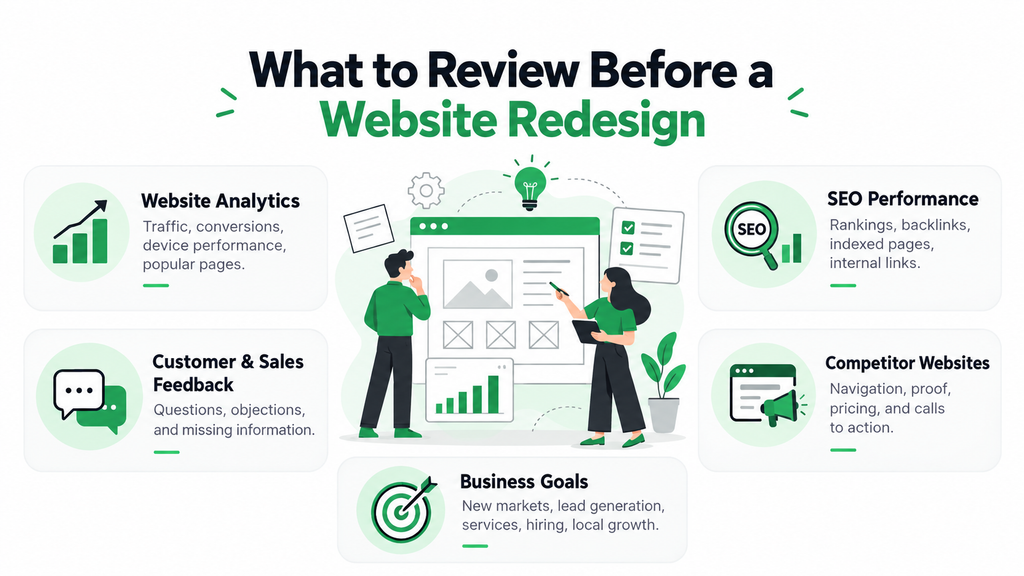
A redesign should begin with evidence, not assumptions. Before a company can decide on what to change, businesses need to know how people are currently using the site, which pages are performing well, where visitors are struggling, and what the company needs the new website to achieve.
1. Website Analytics
Analytics can reveal patterns that are difficult to spot by simply browsing the site. Useful areas to review include:
- Traffic: Understand where visitors come from and whether overall volume is changing.
- Conversions: Identify which pages and channels produce useful actions.
- Device performance: Compare desktop and mobile behavior.
- Popular pages: Protect pages that already attract valuable traffic.
- Exit pages: Look for places where visitors often leave.
- User journeys: Understand how people move through important pages.
This data helps separate genuine problems from personal preferences.
2. Existing SEO Performance
Find out what pages are ranking well in organic search before you change URLs, content, navigation, or page structure. A redesign that doesn’t consider SEO risks breaking signals that took years to build or unintentionally removing valuable content. Review rankings, organic traffic, backlinks, indexed pages, metadata, internal links, and landing-page performance before development starts.
3. Customer and Sales Feedback
Analytics shows what people do. Customers and sales teams can often explain why. Ask what questions prospects raise, what information they struggle to find, what objections come up during sales conversations, and which pages customers mention. These insights can help shape a more useful website.
4. Competitor Websites
Competitor research can reveal common expectations in the market. Look at how competitors organize services, show proof, set up navigation, explain pricing, and drive visitors to action. The goal is not to copy them. It is to understand what customers are seeing elsewhere and where your own site could communicate more clearly.
5. Current Business Goals
The new website should support where the business is going, not only where it has been. From the start, the redesign must be driven by the company’s goals, whether it’s to enter new markets, increase its online lead generation, add new services, enhance its e-commerce capabilities, hire new staff, or grow its local presence.
How to Redesign a Website without Damaging SEO
SEO should be part of the redesign before development begins, not something added after launch. A poorly planned redesign can change URLs, remove useful content, break internal links, and cause important pages to disappear. Careful SEO website migration planning helps reduce that risk.
- Find Your Best Existing Pages
- Map Old URLs to New URLs
- Set Up Proper 301 Redirects
- Preserve Valuable Content
- Review Internal Linking
- Check Metadata & On-Page SEO
- Test the Website Before and After Launch
How to Know Whether the Redesign Actually Worked
A successful redesign should do more than earn compliments about how modern the website looks. The real question is whether it improves business results and the experience people have on the site.
Useful metrics to track include:
- Website conversion rate: Are more visitors taking meaningful action?
- Form submissions: Are enquiries increasing?
- Phone calls: Are more website visitors contacting the business?
- Quote requests: Are more prospects moving into the sales process?
- Online bookings: Has the booking experience improved?
- Ecommerce transactions: Are more visitors completing purchases?
- Mobile conversions: Are mobile users taking action more often?
- Page speed: Has technical performance improved?
- Organic traffic: Has search visibility been protected or strengthened?
- Engagement on important pages: Are people spending more time with useful content?
- Lead quality: Are enquiries becoming more relevant and valuable?
These results should be compared with pre-redesign benchmarks. Without a baseline, it is difficult to know whether a new website conversion rate, faster page speed, or better engagement is really the result of the redesign. The goal is not simply to have a newer website. It is to have one that works better for both the business and the people using it.
Final Thoughts
A small business website does not need a redesign simply because it has been online for several years. The better question is, does it still help customers understand the business, find what they need, trust the company, and act? If the site is fast, clear, mobile-friendly, easy to update, and still generating useful inquiries, a smaller refresh may suffice. Rebuilding it purely for appearance can create unnecessary cost and disruption.
A deeper redesign becomes more reasonable when several problems start appearing together. Poor mobile usability, weak conversions, outdated content, technical issues, difficult maintenance, and confusing navigation can all limit the value of the website. In that situation, a thoughtful website redesign checklist and clear goals can help create a stronger foundation for future marketing. The best redesign is not simply newer. It is easier to use, easier to manage, more relevant to the business, and better at turning visitors into real opportunities.
Is your website still supporting your business goals, or has it started creating unnecessary barriers for potential customers?
Ready to take your digital marketing strategy to the next level? Connect with Ashwani Kumar Sharma and his team at eSign Web Services to explore tailored solutions that help your business grow, improve online visibility, and reach the right audience.
Frequently Asked Questions
Question: How often should a small business redesign its website?
Answer: There is no set schedule for redesigning a website. A business should consider it if usability, conversions, branding, technology, or maintenance start to cause problems. A website that’s been around for years may be doing well, but a new website may need to be changed if it doesn’t support the business goals any longer.
Question: What is the difference between a website refresh and a redesign?
Answer: A refresh does not impact the core foundation of the existing site. It might be new visuals, updated copy, better CTAs, or minor navigation tweaks. A redesign goes deeper and may change structure, technology, user journeys, mobile experience, conversion paths, and SEO setup when the existing foundation no longer works well.
Question: How can I tell if my business website is outdated?
Answer: Old branding, missing services, poor mobile usability, confusing navigation, slow pages, broken features, or outdated business information are common signs of an old website. And the most powerful sign is not age. It is when the website no longer represents the business properly or helps visitors take action.
Question: Can a website redesign help increase conversions?
Answer: Yes, if the redesign is aimed at real barriers. Better CTAs, easier forms, more trust signals, easier navigation, better mobile usability, and more useful service pages all result in better results. A redesign should begin with conversion data and user problems rather than assuming a new visual design will automatically increase inquiries.
Question: Can redesigning a website hurt SEO?
Answer: Yes, when valuable URLs, content, internal links, metadata, or any other SEO signals are changed/removed without proper planning. Careful migration work, including URL mapping, 301 redirects, content preservation, technical testing, and post-launch monitoring, can reduce the risk and help protect existing organic visibility.