AI has quickly worked its way into almost every part of modern business. It is built into search engines, advertising platforms, email tools, CRM systems, accounting software, customer service platforms, analytics dashboards, website builders, and everyday productivity applications. Tools such as ChatGPT, Gemini, and other forms of generative AI have also made advanced technology available to businesses that would never have considered building their own AI systems.
A sensible approach to AI for small businesses is therefore not about squeezing AI into every department. It is about finding the jobs where technology can remove unnecessary work, speed things up, or help people understand information more clearly. The businesses likely to get the most value from AI are not necessarily the ones using the most tools. They are the ones that know exactly why they are using them.
Why Do Small Businesses Feel Pressure to Adopt AI?
It is easy to understand why many owners feel as though they need to move quickly. AI is discussed constantly. Software companies are adding new features, competitors are talking about automation, and almost every business function seems to have an AI-powered product attached to it. For some owners, doing nothing can feel like falling behind.
- Smaller teams: This is one area where AI for small businesses can genuinely be useful. Small teams often have people covering several responsibilities at once. Someone may handle emails, reporting, marketing, customer inquiries, and administration on the same day. If AI removes some of that repetitive work, it can free up time for more valuable tasks.
- Constant new tools: New AI tools for small businesses are appearing all the time. They promise faster writing, easier reporting, better sales, stronger customer service, smarter marketing, and more productivity. Some are genuinely useful. Others solve problems a business does not really have.
- Efficiency expectations: AI is often sold as a shortcut to better business efficiency. That can happen, but only when the tool fits the process. If staff spend more time learning software, fixing outputs, or moving information between systems, the expected efficiency can disappear very quickly.
The pressure to adopt AI is real, but it should not drive the decision. A business should first ask what is currently slow, expensive, repetitive, frustrating, or difficult to manage. The technology should come afterwards.
Where Can AI Deliver Real Value for Small Businesse
For most small companies, the best uses of AI are fairly practical. They are not always the most exciting examples, but they can make a noticeable difference to day-to-day work.
- Documents: AI can help prepare first drafts of routine documents, internal notes, summaries, templates, and straightforward communications.
- Meetings: Instead of asking someone to write notes throughout a meeting, AI tools can create summaries, action points, and follow-up lists from recorded conversations.
- Information organisation: Large sets of notes, forms, spreadsheets, or enquiries can be sorted and summarised much faster than doing everything manually.
This kind of small business automation works well because it removes repetitive effort without taking ownership of important decisions. Employees still decide what matters. AI simply helps them get to the useful part of the work sooner.
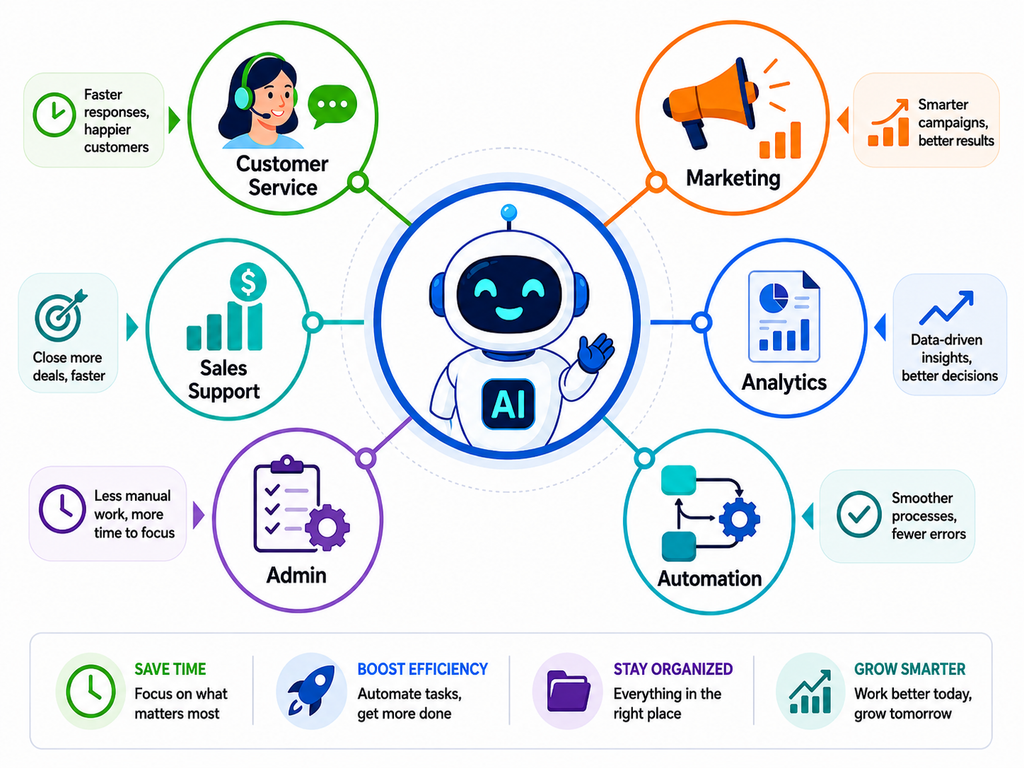
1. Customer Service
Customer support is another area where AI can be useful, especially when a business receives the same questions repeatedly. AI chatbots can help visitors find opening hours, service details, delivery information, appointment instructions, or basic account guidance.
Customer service automation can also help sort support tickets, suggest replies, or direct enquiries to the right person. The limit should be clear, though. A chatbot may be perfectly capable of answering “What time do you close?” It is far less suited to handling a frustrated long-term customer whose situation needs judgment, empathy, or negotiation.
2. Sales Support
Sales teams often spend more time on admin than they realise. AI can help organise enquiries, summarise conversations, suggest follow-up tasks, or support CRM automation. Imagine a local service business receiving 60 enquiries in a week. Rather than asking someone to manually categorise every lead, an AI-assisted CRM could help group them by service type, urgency, or location. The sales team would still decide who to contact, how to handle the conversation, and whether the opportunity is genuinely valuable. That is a much healthier use of AI than trying to automate the entire sales relationship.
3. Reporting and Data Analysis
Business owners often have plenty of data but very little time to interpret it. AI-assisted data analytics can help summarise performance, identify unusual changes, compare periods, and highlight areas that deserve attention. For example, a company may notice that website leads have increased while sales have stayed flat. AI can help surface that pattern faster, but people still need to understand why it is happening. The software helps find the signal. The business decides what it means.
4. Workflow Management
Many small businesses have simple processes that repeat every day. A website enquiry may need to be added to the CRM, assigned to a member of staff, acknowledged by email, and followed up within a set period. Workflow automation can connect these steps. This is where AI business automation can be especially useful. It removes manual handoffs and reduces the risk of routine tasks being forgotten. The best results usually come from automating the predictable parts while keeping people involved when something unusual happens.
How Much AI Does Your Marketing Actually Need?
Marketing is one of the areas where AI has become impossible to ignore. It is now involved in SEO, paid advertising, content, social media, email, reporting, audience analysis, and campaign optimisation. That does not mean every part of marketing should be automated.
1. SEO
AI-powered SEO can help marketers review large amounts of information, compare competing pages, identify topic gaps, organise content ideas, and spot technical or content issues. It can make research faster, but SEO still depends heavily on understanding customer intent, commercial value, competition, and the wider goals of the business. A tool can tell you that competitors are covering a topic. It cannot automatically decide whether that topic deserves the business’s time and budget.
2. AI Search, GEO, and AEO
The growth of AI search is changing the way people discover information. Businesses are increasingly thinking about whether their content can appear in AI-generated answers, search summaries, answer engines, and conversational platforms. AI can help review how clearly a website explains a service, subject, entity, or customer question. What it cannot do is replace the need for useful, original information. Publishing hundreds of AI-generated pages will not necessarily improve visibility if those pages offer little beyond what already exists elsewhere.
3. Google Ads
Google Ads automation can be extremely useful. Google can adjust bids during auctions, process audience signals, test asset combinations, and optimize campaigns using a level of data that would be impossible for a marketer to handle manually. The platform still does not know everything about the business.
A conversion may look valuable inside an advertising dashboard but turn out to be a poor-quality lead. A campaign may generate a high number of enquiries while producing very little profit. People still need to connect the advertising data with what is happening inside the business.
4. Meta Advertising
Meta Ads automation can help with placements, bidding, audience expansion, campaign optimisation, and creative testing. Again, the technology is good at processing data quickly. It is less capable of deciding what the business should stand for, which offer matters most, or whether the campaign is attracting the right kind of customer.
5. Content Marketing
AI content creation can make research, outlines, editing, ideation, repurposing, and early drafting much faster. Used well, it can help a content team produce stronger work more efficiently. Used badly, it can lead to repetitive articles that sound almost identical to everything else online. AI should support the writer, not remove the need for subject understanding, examples, judgment, fact-checking, and a recognisable brand voice.
6. Email and Personalisation
Marketing automation can make email campaigns far easier to manage. Businesses can segment audiences, send triggered emails, organise follow-ups, and use personalization based on customer actions or preferences. The software can decide when an email is sent. A person should still decide what the business actually wants to say.
That balance is what makes AI marketing for small business useful without turning communication into something that feels completely automated.
Practical Example: A local professional-services firm could use AI to prepare content outlines, review campaign data, sort leads, and automate routine follow-ups. The marketing team would still choose the offer, approve the final content, set priorities, and decide how campaigns should respond to what customers are actually doing.
Where Should AI Assist Rather Than Take Control?
There are plenty of areas where AI can be useful without being allowed to make the final call.
- Strategy: AI can gather information, compare options, and help organise ideas. Business strategy still depends on experience, timing, resources, risk, and an understanding of what the company is trying to achieve.
- Brand positioning: A tool can generate dozens of positioning ideas in seconds. It cannot fully understand how a business wants customers to feel about it or what reputation it is trying to build over time.
- Creative direction: AI can suggest concepts, headlines, visuals, or campaign angles. People should still decide what feels right for the brand and audience.
- Important customer communication: Complaints, negotiations, sensitive conversations, and high-value accounts need context. A technically correct automated response can still feel completely wrong in the moment.
- Financial decisions: AI may support forecasting or analysis, but pricing, spending, hiring, investment, and cash-flow decisions should always have clear human ownership.
- Quality control: AI-generated work can be polished and still contain mistakes. Strong human oversight remains important whenever an inaccurate answer could create a financial, legal, or reputational problem.
The most useful approach to artificial intelligence for small business is often to let AI prepare, organise, or analyse information while people remain responsible for the final decision.
What Are the Hidden Costs and Risks of Using Too Much AI?
The biggest mistake businesses can make is assuming that more automation always means more efficiency. Sometimes it does. Sometimes it simply creates more software to manage.
- Tool Overload: It is surprisingly easy for a company to end up paying separately for AI writing, meeting notes, reporting, email, customer support, marketing, CRM management, design, and workflow automation. Each subscription may look inexpensive on its own. Together, the cost can become significant.
- Poor Integrations: A useful AI platform can still become a bad investment if it does not fit with the rest of the business. If employees have to copy information from the AI tool into another platform manually, a large part of the promised efficiency may disappear. The best technology usually works quietly inside an existing workflow instead of forcing the company to rebuild everything around it.
- Weak Output Quality: Automation does not improve bad work. It simply makes it possible to produce more of it. An inaccurate report, weak customer email, poor-quality article, or incorrect automated action can cause much more damage when it is repeated at scale. Review remains important.
- Accuracy: Generative AI can produce an answer that sounds completely convincing and is still wrong. This matters even more when AI is being used for legal information, technical advice, financial analysis, customer communication, or public-facing content. Important outputs need checking.
- Intellectual Property and Compliance: Copyright, ownership, confidentiality, regulation, and industry-specific requirements should all be considered before AI is deeply embedded into a business process. At the end of the day, the technology is not accountable for the outcome. The business is.
A Simple AI Adoption Framework for Small Businesses
A practical framework can make AI adoption for small business much easier to manage.
Step 1 – Identify the problem: Start with something specific. “We need more AI” is not a problem. “Our team spends eight hours every week preparing the same report” is.
Step 2 – Understand the current cost: Look at employee time, software costs, customer delays, missed opportunities, and any impact on revenue.
Step 3 – Check whether AI is really needed: Sometimes the answer is a better process, clearer training, a simple spreadsheet, or a feature already available inside existing software.
Step 4 – Choose one use case: Pick an area where the difference will be easy to see.
Step 5 – Test it on a small scale: There is no need to automate an entire department on day one.
Step 6 – Keep review in place: Decide who checks the output and what happens when something looks wrong.
Step 7 – Measure the result: Compare the new process with the old one.
Step 8 – Document what works: If the test saves time or improves quality, create a clear process so the team can use it consistently.
Step 9 – Connect it with existing workflows: Successful automation should make current systems easier to use, not create a completely separate way of working.
Step 10 – Expand carefully: Increase AI adoption when there is evidence that the previous use case has delivered real value.
This approach keeps AI practical. It also gives businesses permission to stop using something if it turns out not to be useful.
What Level of AI Adoption Does Your Business Need?
Not every business needs the same depth of automation. A useful way to think about small business AI is through three broad levels.
Level 1: AI-Assisted Business
At this stage, people still complete and approve most work. AI helps with research, brainstorming, summaries, first drafts, data organisation, and repetitive administration. This is a sensible starting point for businesses that are still learning what AI can and cannot do well.
Level 2: AI-Integrated Business
AI becomes part of selected workflows. The business may use it for CRM updates, email automation, customer support, reporting, advertising optimisation, scheduling, or routine internal processes. This level tends to suit companies that already have fairly stable processes.
Level 3: AI-Automated Business
At this stage, AI and automation handle meaningful parts of repetitive operations. Systems may share information, trigger actions, complete several connected tasks, and only involve staff when something unusual happens. This can work well, but only when the underlying processes are already reliable. Automating a messy process usually creates a faster version of the same mess. Most small businesses do not need Level 3 across the whole company.
Marketing may be highly automated while customer relationships remain very hands-on. Administration may use AI heavily while strategic decisions remain completely human. That mixed approach is often the most sensible one.
How Do You Know Whether an AI Tool Is Worth Paying For?
AI software should earn its place in the business. Before adding another monthly subscription, it helps to ask a few straightforward questions.
- Problem solved: What does this tool actually improve?
- Time saved: How many hours could it realistically save every month?
- Employee use: Will people use it regularly, or will it become another forgotten login?
- Duplication: Is the same feature already included in software the business is paying for?
- Integration: Can the platform work with the company’s existing systems?
- Risk: What happens when it gets something wrong?
- Measurement: Can the improvement be tracked?
- Financial value: Does the expected return on investment justify the subscription, training, implementation, and management involved?
Businesses should also look at their existing CRM, accounting software, analytics platforms, email systems, and advertising tools before buying anything new. AI capabilities are increasingly being included in products companies already use.
Measuring AI ROI
The numbers do not need to be complicated. A business can look at hours saved, operating costs reduced, faster response times, better reporting, increased employee capacity, improved marketing efficiency, stronger lead generation, more conversions, better customer satisfaction, and revenue impact.
A £200 monthly tool that saves 30 hours of staff time may make financial sense very quickly.
A £200 tool that produces a few ideas employees rarely use probably does not.
ROI Check: If nobody in the business can explain what has improved since an AI tool was introduced, it may not be delivering enough value to justify the cost.
What Are the Signs Your Business Is Using Too Much AI?
There is a point where technology stops simplifying work and starts getting in the way. One sign is employees constantly switching between different AI platforms. Another is customer communication beginning to feel generic, repetitive, or strangely disconnected from the conversation. If the team cannot explain why a platform is needed, it is worth reviewing whether it belongs in the business at all. Clear accountability matters as well. AI should not quietly become responsible for important decisions simply because nobody has defined where human approval is required.
What Does a Practical Small-Business AI Stack Look Like?
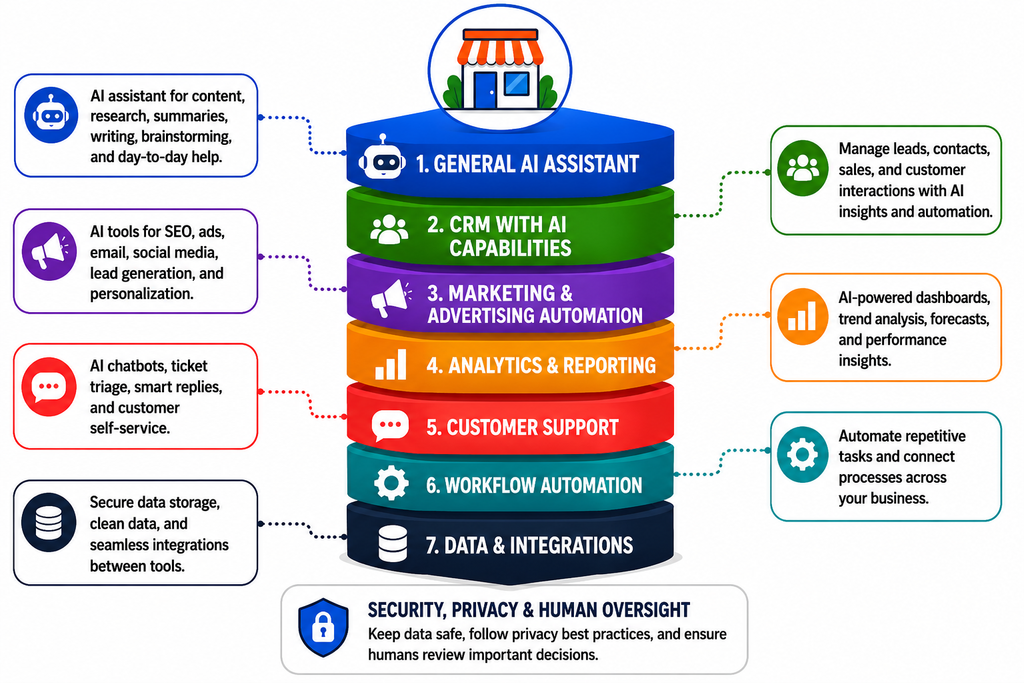
Most small businesses can do plenty with a fairly simple setup. They do not need a separate AI product for every business function.
- General assistance: One capable general-purpose AI assistant may be enough for brainstorming, research, summaries, drafting, and everyday support.
- CRM: Existing customer-management software can handle lead organisation, follow-ups, sales activity, and some automation.
- Marketing: SEO, advertising, email, social media, and content platforms increasingly have useful AI capabilities built in.
- Analytics: A central reporting setup can often provide more value than several disconnected AI reporting tools.
- Customer support: Automation makes sense when enquiry volume is high and a large share of questions are predictable.
- Operations: Additional workflow tools should only be added when the savings are clear enough to justify them.
The aim is not to build an impressive collection of software. It is to create a simple system that employees can actually use.
What Does the Future of Small Business AI Look Like?
AI is likely to become less noticeable as a separate category of software. More of it will simply be built into the platforms businesses already use. AI agents may also become more practical for small businesses. Instead of completing one task at a time, they may be able to collect information, update records, prepare reports, send routine communications, and hand unusual situations to a member of staff. As that happens, governance will become more important.
Businesses will need clearer rules around privacy, security, access, accuracy, and responsibility. Interestingly, more capable AI may make certain human skills even more valuable. Judgment, creativity, trust, customer understanding, leadership, strategic thinking, and relationship building are difficult to reduce to a repeatable automated process. The small businesses that use AI well will probably not be the ones chasing every new platform. They will be the ones that know when technology is useful and when a person should take over.
Conclusion
Small businesses do not need to turn themselves into technology companies to benefit from AI. A much more practical approach is to look at where time, money, productivity, or customer opportunities are being lost and decide whether AI for small business can genuinely improve those areas. For many businesses, the right setup will be simpler than expected.
AI can take on repetitive administration, support research, organise data, speed up reporting, assist marketing, and help manage routine workflows. People should continue to lead strategy, customer relationships, creative decisions, financial judgment, quality control, and sensitive conversations. Good AI business automation is not about removing people from as many processes as possible. It is to use enough AI to make the business better without making it unnecessarily complicated.
Ready to Find the Right Balance Between AI and Human Strategy?
At eSign Web Services, we help businesses bring together SEO, GEO, AEO, paid advertising, content marketing, social media, automation, and human expertise around clear business goals. If you want to understand where AI can genuinely improve visibility, efficiency, marketing performance, and customer acquisition without adding tools your business does not need, connect with our team for a digital marketing proposal built around practical results.
Frequently Asked Questions
Question: How can a small business start using AI?
Answer: Start with one repetitive or time-consuming problem instead of trying to introduce AI everywhere. Test it with reporting, meeting summaries, content support, customer enquiry organisation, or routine administration. Measure whether it saves time, improves quality, or reduces manual work before expanding it to other business areas.
Question: What are the best uses of AI for small businesses?
Answer: AI can be useful for administration, data organisation, marketing analysis, content support, customer service, CRM updates, reporting, research, and workflow management. The best use depends on the company’s real needs. Businesses should start with areas where improvements in time, cost, productivity, or customer experience can be measured.
Question: Does every small business need AI?
Answer: No. A small business does not need advanced automation simply because AI is widely available. AI makes sense when it improves an existing process or solves a real business problem. Some companies may only need a few AI-assisted tools, while businesses with higher volumes may benefit from deeper automation.
Question: How much should a small business spend on AI tools?
Answer: There is no fixed amount that every business should spend. The cost should be judged against the value created. Businesses should compare subscription fees, training, setup, and management costs with time saved, lower operating costs, better productivity, increased leads, or additional revenue before deciding whether a paid tool is worthwhile.
Question: What business tasks should not be completely automated with AI?
Answer: Strategic decisions, sensitive customer communication, major financial choices, hiring matters, legal issues, complex sales conversations, reputation management, and final quality approval should usually retain human involvement. AI can provide research and support, but decisions carrying serious financial, personal, or reputational consequences need clear human responsibility