If you ask ten business owners how much to spend on Google Ads, you may get ten different answers. One might spend a few hundred dollars each month, while another invests several thousand. Both could be making sensible decisions. An online clothing store, a local cleaning service, and a law firm all have different advertising costs, and they all make different amounts of money from their customers. Businesses should not just look at the amount being spent on advertising but instead ask whether they are attracting the right people and making enough money to justify the spending.
In this blog, we’ll look at how to plan a realistic small business Google Ads budget based on click costs, conversion rates, customer value, and sales targets. We’ll also explain why limited budgets sometimes hold campaigns back, when spending more could help, and which performance figures are worth watching. The aim is to help you make informed budget decisions rather than relying on estimates that may not suit your business.
Why There Is No Universal Google Ads Budget for Small Businesses
You’ve probably seen advice telling small businesses to spend a certain amount on Google Ads each month. Those numbers give you a sense of the scope but don’t tell the whole story.
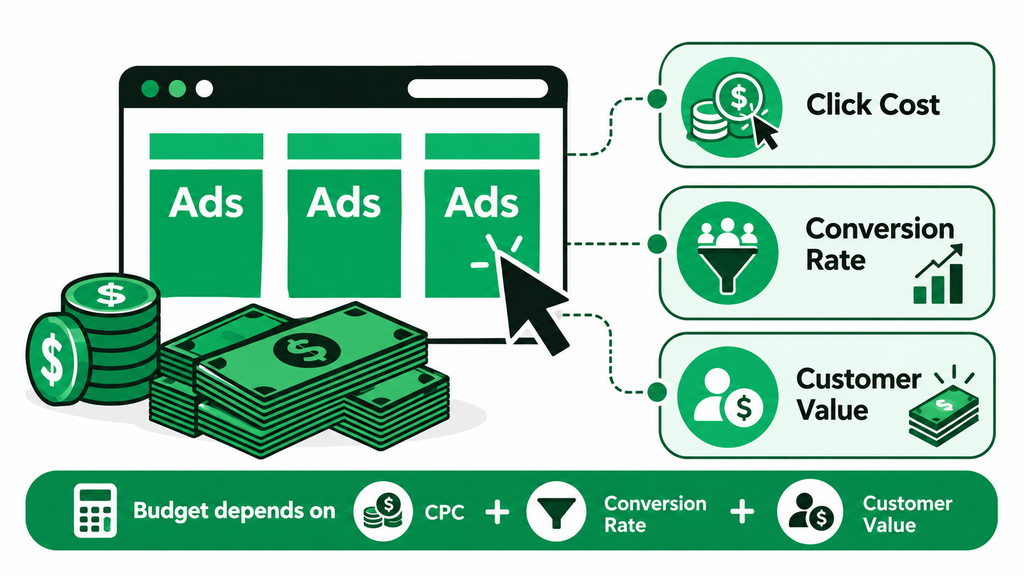
What works for a neighborhood bakery may not work for a roofing company or a law firm. The answer depends on how competitive your market is, how much customers mean to you, and how much it costs to get to them.
1. Different Industries Have Different Click Costs
Some businesses face much tougher competition in Google Ads than others. Take legal services, insurance, or specialized home repairs. Advertisers in these industries may be willing to pay more for a click because winning just one customer can bring in substantial revenue.
A small retailer selling everyday products may not have that flexibility. Before deciding what to spend, look into the likely cost per click for the products or services you want to advertise. This will give you a better idea of what your budget can realistically achieve.
2. Conversion Rates Vary Significantly
Two companies can receive exactly the same number of clicks and end up with very different results. Imagine one website turns 8% of visitors into inquiries, while another converts only 2%.
The second company would need much more traffic to generate the same number of leads, assuming the quality of visitors is similar. Your conversion rate depends on several things, including the website experience, the offer, customer intent, and how easy it is to get in touch.
3. Customer Value Changes What You Can Afford
A business earning $100 from an average customer usually can’t afford to spend as much on advertising as one earning $5,000. Profit margins make that difference even more important.
Companies with higher customer value may be able to compete for expensive keywords and still make a healthy profit. This is one reason budget planning should begin with the business’s numbers, not a general recommendation found online.
Understand How Google Ads Budgets Actually Work
Google Ads doesn’t necessarily spend the same amount every day. Most campaigns use an average daily budget, meaning Google can spend more when good traffic opportunities exist and less when demand is lower. Knowing this can help you avoid surprises when you look at your spending on a daily basis.
1. Average Daily Budget
An average daily budget is the amount you’re comfortable spending each day when averaged across the month. If you set a budget of $30 per day, that doesn’t mean Google will spend exactly $30 every single day.
The figure is used to calculate the campaign spending limits. You can also decide to set different daily budgets for different campaigns, depending on which of your services or products matter most to your business.
2. Daily Spend Can Fluctuate
People don’t search for the same things in equal numbers every day. Some days are more opportunity-filled than others in terms of reaching potential customers.
Google can respond by spending more on busier days and less on slower ones. For most campaigns, daily spending can reach up to twice the average daily budget, while remaining subject to the applicable spending limits.
3. Monthly Budget Calculation
For most campaigns, Google works out the monthly spending limit by multiplying the average daily budget by 30. 4. You can also reverse the calculation when you already know how much you want to spend each month.
Formula:
Monthly budget ÷ 30.4 = Average daily budget
For example:
$1,520 ÷ 30.4 = $50 average daily budget
So, if your planned Google Ads monthly budget is $1,520, you could set an average daily budget of around $50.
This makes it easier to connect your monthly advertising plan with the settings inside Google Ads.
4. Define the Monthly Lead or Sales Target
Start by setting a realistic monthly target. For example, your business might want:
- 20 qualified leads.
- 10 booked consultations.
- 50 ecommerce sales.
- 15 relevant phone inquiries.
The target should match both your sales expectations and your ability to handle new customers. A small service business that can take on only 15 extra projects each month may have little reason to chase hundreds of inquiries.
Calculate How Much a Lead or Customer Is Worth
One of the most important parts of PPC budget planning is knowing what a customer is worth to your business. Without that information, it’s difficult to tell whether paying $30 for a lead is a bargain or whether $100 is too much. The answer depends on how much customers spend, what profit remains, and how many inquiries eventually turn into sales.
1. Start With Average Customer Value
Begin by looking at how much revenue an average customer brings in. A home improvement company, for example, might earn $2,000 from a typical project. An online store may receive only $80 from an average order.
These figures help you understand the potential value of a conversion. But revenue isn’t the same as profit, so you’ll need to look a little deeper before deciding what you can afford to spend.
2. Consider gross margin
Gross margin tells you how much revenue remains after covering the direct costs of providing a product or service. Suppose a company earns $2,000 from a project and has a 40% gross margin. That leaves $800 in gross profit before advertising and other operating expenses. If acquiring that customer costs $900, the sale would generally be unprofitable unless there are other factors that justify the expense. This is why looking at revenue alone can lead to poor advertising decisions.
3. Include the Sales Close Rate
Not every inquiry becomes a paying customer. If your business converts 25% of qualified leads into sales, you’ll need about four qualified inquiries to win one customer. Now suppose you can afford to spend $200 acquiring that customer.
With a 25% close rate, your maximum affordable cost per qualified lead would be around $50. This calculation helps connect what happens in Google Ads with what happens during the sales process.
4. Set a Maximum Affordable CPA
Customer acquisition cost shows how much you’re spending to gain a paying customer. Your maximum affordable CPA should account for gross profit, operating costs, sales performance, and the profit you want to retain. For example, spending $150 to acquire a customer who contributes $500 in gross profit may be worthwhile.
Whether it’s a good result ultimately depends on the other costs involved in running the business.
Use CPC to Estimate How Much Traffic Your Budget Can Buy
Click costs give you a practical way to estimate how many people your advertising budget might bring to your website. The actual numbers will vary, but the calculation can help you understand whether your planned spending is likely to generate enough traffic.
1. Estimate Your Expected CPC
Google Ads Keyword Planner can help you explore keyword demand and estimated advertising costs. If you’ve already run campaigns, your own account data can be even more useful because it shows what you’ve actually paid. Look at the keywords relevant to your services and consider how competition, location, and search intent might affect the price. Try not to base your entire budget on one unusually cheap or expensive keyword.
2. Calculate Estimated Click Volume
The calculation itself is simple.
Formula:
Monthly budget ÷ Average CPC = Estimated clicks
For example:
- Monthly budget: $1,500
- Average CPC: $5
$1,500 ÷ $5 = approximately 300 clicks
So, if your average CPC stays close to $5, a $1,500 budget could bring around 300 clicks. Of course, this is an estimate. Actual traffic will depend on auction conditions and campaign performance.
3. CPC Alone Does Not Tell You Whether the Budget Is Good
A low-cost click isn’t always a valuable click. Someone searching for general information might be cheaper to reach but have no immediate plans to buy. Meanwhile, a person actively looking for a service provider may cost more to reach and be much closer to making a decision. Instead of judging traffic by price alone, look at whether those visitors become qualified leads or customers.
4. Use Conversion Rate to Estimate Lead Volume
Once you have an idea of how much traffic your budget could generate, the next step is estimating how many visitors might convert. Your conversion rate measures the percentage of clicks that result in a tracked action, such as an inquiry, booking, or purchase.
Using the earlier example:
- Estimated clicks: 300
- Expected conversion rate: 5%
Estimated leads = 300 × 5% = 15
If your business needs 30 leads each month, the budget may not be enough unless you can improve conversion performance.
5. Be Conservative with New Campaign Estimates
When a campaign is new, you won’t have much performance history to work with. Your landing page may not have been tested, and you may still be learning which searches attract the right people. Rather than relying on one optimistic conversion rate, calculate a few possible outcomes. For example, compare expected leads at 3%, 5%, and 7% to see how much the results could vary.
A Simple Formula for Estimating a Starting Google Ads Budget
There are a few ways to work out a reasonable starting budget for Google Ads. What you know about your business right now, such as what you expect to pay per click, your monthly lead goal, or how much you can afford to spend to acquire customers, will dictate the best method.
These calculations aren’t going to guarantee results, but they can help you make a more educated decision before you launch a campaign.
Method 1: Based on Click Volume
This approach starts with the number of clicks you want your campaign to receive.
Formula:
Target clicks × Estimated CPC = Monthly budget
For example:
200 clicks × $6 CPC = $1,200 monthly budget
This method is useful when you’re trying to collect enough traffic to understand how people respond to your ads and landing pages. However, it doesn’t tell you how many leads or customers those clicks will generate. You’ll still need conversion data to make that estimate.
Method 2: Based on Lead Target
If you already know how many leads you want each month, you can work backward to estimate the required spending. Let’s say your business wants 20 leads and expects a 5% conversion rate.
Required clicks:
20 ÷ 5% = 400 clicks
If the average CPC is $4:
400 × $4 = $1,600 monthly budget
This approach is helpful because it connects your advertising costs with a specific business goal. The more accurate your conversion estimates are, the more useful the calculation becomes.
Method 3: Based on Affordable CPA
Another option is to start with the amount your business can afford to pay for each lead. Suppose you can spend up to $80 per lead and want to generate 25 leads every month.
Formula:
Target leads × Affordable cost per lead = Monthly budget
25 × $80 = $2,000 monthly budget
This gives you a spending estimate based on your financial limits. Keep in mind that setting an $80 target doesn’t mean Google Ads will automatically deliver leads at that price.
Comparing the Three Methods
| Budgeting Method | Main Input | Example Monthly Budget |
| Click volume | 200 clicks at $6 CPC | $1,200 |
| Lead target | 20 leads at 5% conversion and $4 CPC | $1,600 |
| Affordable CPA | 25 leads at $80 each | $2,000 |
Ideally, you should consider all three methods before settling on a budget. If the estimates are very different, take another look at your assumptions. Your lead target, expected conversion rate, or affordable acquisition cost may need adjusting.
Practical Example: Imagine a business wants 30 leads each month but can only afford enough advertising for 100 clicks. If its website converts 5% of visitors, it may generate around five leads. In that situation, the campaign isn’t necessarily performing badly. The budget may simply be too small for the target.
How Much Data Does a Campaign Need Before You Judge It?
One mistake small businesses make is deciding that Google Ads isn’t working after just a few days. It’s understandable. When you’re paying for every click, you want to see results quickly. But if a campaign has received only a small number of clicks, there may not be enough information to judge its performance fairly.
There is no set number of clicks or conversions needed for every campaign. It is contingent upon what you’re measuring, how often customers convert, and what decisions you’re trying to make.
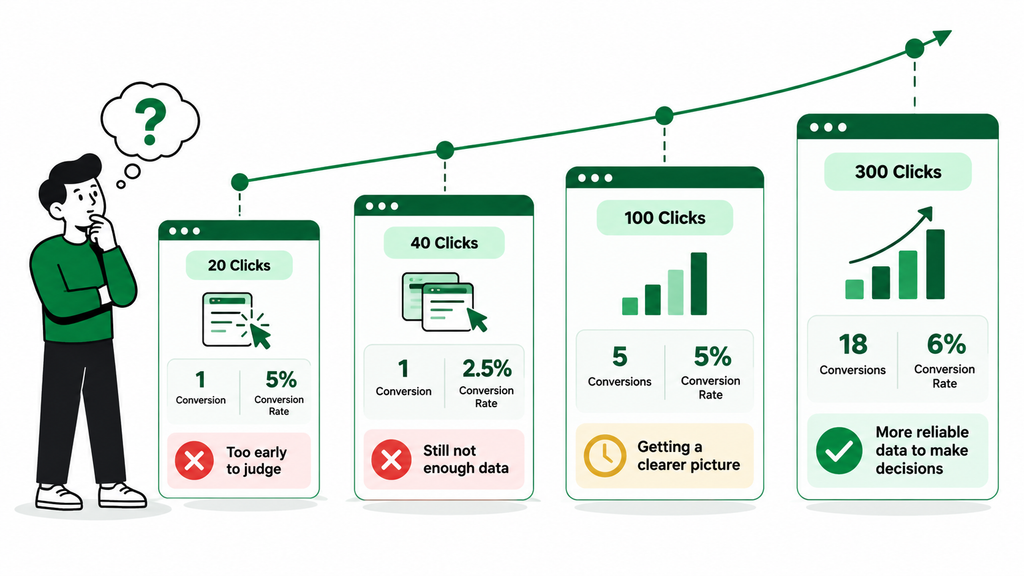
1. One or Two Conversions Are Not Enough to Draw Strong Conclusions
Suppose your campaign receives 20 clicks and generates one lead. That gives you a 5% conversion rate. Now imagine the next 20 clicks produce no inquiries. Your overall conversion rate drops to 2.5%.
Nothing major may have changed. The sample is simply too small to provide a reliable picture. This is why it’s worth looking at performance over a reasonable period before making significant changes, unless there’s an obvious issue that needs immediate attention.
2. Automated Bidding Needs Useful Conversion Signals
Google’s automated bidding strategies use campaign information to make bidding decisions. When you’re using a strategy focused on conversions or conversion value, accurate tracking becomes particularly important.
If your campaign has very few meaningful conversions, it may take a longer time to see if your bidding strategy is working well. Instead of trying to artificially inflate conversion numbers, track the actions that matter to your business.
What Happens When Your Google Ads Budget Is Too Low?
A modest budget isn’t necessarily a bad thing. Plenty of businesses run focused campaigns without spending large amounts. Problems arise when the budget is so limited that the campaign struggles to reach relevant customers or collect enough information to improve.
1. Learning Takes Longer
Fewer clicks mean it takes longer to learn how your customers are responding to your ads. It may take a few weeks to determine what keywords are bringing in leads or if a landing page needs to be adjusted. This can slow down optimization because there is just not enough activity to expose useful patterns.
2. Strong Keywords May Compete for Limited Spend
Imagine you’re running a campaign with dozens of keywords but a small daily budget. Some of those keywords will get you people who are ready to buy; others will get you people who are still doing research. Splitting your budget between the two types of search may not give your best keywords enough exposure. Regularly review the search terms and focus on the queries that are closely linked to your services and sales objectives.
3. The Business May Incorrectly Assume Google Ads Does Not Work
It’s disappointing to receive some clicks from a campaign but no leads. But that doesn’t necessarily mean Google Ads isn’t good enough for the business. Sometimes the campaign has lacked enough relevant traffic to make a meaningful test. Before you completely turn off advertising, consider if the campaign was given a fair chance at success with the budget, targeting, and conversion tracking.
Can a Google Ads Budget Be Too High?
Yes, and it’s something that businesses sometimes miss out on. If the campaign is profitable, and there are more customers to reach, spending more can help. But increased spending may at some point bring in less valuable traffic or make each new customer more expensive. The question is whether the campaign can use the additional money effectively.
1. More Budget Can Expand Into Weaker Traffic
A campaign may already be reaching many of the customers searching for its most relevant services. Increasing the budget could allow it to compete for more searches, but some of those searches may have weaker buying intent.
You might see clicks increase without a similar improvement in inquiries or sales. That’s why additional traffic should be judged by its quality, not just its volume.
2. Cost per Acquisition Can Rise
As spending increases, the campaign may begin competing in more auctions or reaching people who are less likely to convert. This can push up the average cost of acquiring a customer.
If that cost moves beyond what the business can afford, the additional spending may start reducing profitability. Keep an eye on acquisition costs as you scale rather than assuming past results will continue at the same rate.
3. Search Demand May Be Limited
Some businesses serve very specific markets. A specialist contractor working in one small area, for example, may have only a limited number of relevant searches each month. Increasing the budget won’t create more people searching for that service. In situations like this, improving the landing page or increasing the percentage of visitors who inquire may be more useful than spending more.
What Does “Limited by Budget” Really Mean?
You may have seen the “Limited by budget” status in Google Ads, often alongside a recommendation to increase spending. The status generally means your campaign could be missing eligible traffic because its budget is restricting delivery. However, it doesn’t tell you whether that additional traffic would be profitable.
1. It Does Not Automatically Mean Increase the Budget
A campaign can be limited by budget and still generate poor-quality leads. If you’re already paying too much for each customer, increasing spending may simply produce more expensive inquiries. Start by checking whether the campaign is delivering acceptable results. If performance is strong and more relevant demand is available, a budget increase may be worth considering.
2. Review Search Terms
Look at the actual searches triggering your ads. Are people searching for services you provide? Are they located in the areas you serve? Do their searches suggest genuine buying interest? You may discover that part of the budget is being spent on unrelated or low-value queries. Adding suitable negative keywords and improving targeting can sometimes free up spending without increasing the budget.
3. Review CPA or ROAS
For lead generation campaigns, compare your acquisition cost with the amount your business can afford. For e-commerce, review the return on ad spend alongside product margins and actual profitability. If the numbers aren’t working, spending more shouldn’t be your first move. Find out what’s causing the poor performance before deciding whether additional investment is justified.
How Budget Requirements Change by Campaign Type
Not every Google Ads campaign is built the same. Search, Shopping, Performance Max and other campaign types connect with customers in different ways. Their costs and outcomes differ, so it is not logical to give each a similar budget regardless of its intent.
1. Search Campaigns
With search campaigns you can find people who are looking for products or services like yours right now. These campaigns can be useful for businesses that rely on inquiries, since the search by the customer often gives you an idea of what they need. Also, factor in the cost-per-keyword, search volume, and expected conversions. For a small business with limited funds, a focused search campaign might be a practical place to begin.
2. Performance Max
Performance Max uses Google’s automation to display your ads across multiple Google channels. The performance of the campaigns depends on things like conversion goals, creative assets, audience signals, and the data Google’s systems have access to. Make sure your conversion tracking is robust so you can assess the quality of the results before you invest a substantial budget. More placements don’t automatically mean more profitable customers.
3. Shopping Campaigns
Shopping campaigns are designed for retailers advertising products. How much you can afford to spend depends on the price of the products, the profit margin, the competition, and how often visitors make purchases. For example, a retailer with thin-margin items may need to be much more strict on acquisition costs than a store with higher-margin products. Advertising traffic also converts based on product information and shopping experience.
4. Demand Gen and Display
Demand Gen and Display campaigns allow businesses to reach people beyond traditional keyword searches. They can be used for building awareness, helping with consideration, or conversions, depending on the strategy. However, their cost-per-click and conversion behavior may differ from search campaigns. “Don’t expect these campaigns to do the same things, but judge them on what they are meant to achieve.”
5. Local Lead Generation
Local businesses often rely on phone calls, bookings, and requests for quotes. Their budgets should reflect how many people search for their services in the target area and what a qualified enquiry is worth. A contractor serving a small geographic area may get better results from focused targeting than from advertising across an entire region. The important thing is reaching customers the business can actually serve.
Should New Advertisers Start Small?
If you’re new to Google Ads, starting with a controlled budget can be a sensible decision. You don’t need to commit a large amount before understanding how your market responds. However, the budget should still be large enough to generate useful information. Spending very little won’t help if the campaign receives almost no relevant traffic.
1. Start With a Controlled Test
Choose an amount your business can comfortably sustain while testing the campaign. Before launching, make sure the advertisements, targeting, landing pages, and conversion tracking are properly set up. Give the campaign enough time to collect meaningful data.
The first few days may tell you something about traffic quality, but they rarely provide a complete picture of long-term performance.
2. Avoid Spreading a Small Budget across Too Many Campaigns
A common mistake is launching several campaigns at once with very little money assigned to each. The result is that none of them receives enough traffic to evaluate properly. Start with the products or services that matter most to your business. Once you understand their performance, you can decide whether other campaigns deserve a share of the budget.
3. Set a Learning Objective
During the early stages, focus on understanding how the campaign behaves. Some useful things to examine include
- Search-term quality: Are your ads appearing for relevant searches?
- Average CPC: How much are you paying for each click?
- Website conversion rate: Are visitors taking meaningful actions?
- Qualified lead quality: Are the inquiries worth following up?
These findings can show whether the next improvement should involve targeting, advertisements, landing pages, or the budget itself.
How Should Small Businesses Allocate Their Budget Across Campaigns?
Dividing your budget equally between campaigns might seem like the simplest option, but it isn’t always the most effective. Some services generate more profit than others. Certain campaigns may already produce reliable enquiries, while others are still being tested. Your budget allocation should reflect those differences.
1. Prioritize High-Intent Campaigns
If you have a limited amount of money, then start with campaigns aimed at those people closer to a purchase or inquiry. For instance, a home repair business might get more short-term value advertising their core repair services than advertising for broad informational searches.
That doesn’t mean awareness campaigns have no value. It simply means your first priority should match the business’s immediate goals.
2. Reduce Spend on Weak Campaigns
Not every underperforming campaign needs to be paused immediately. First, find out why it’s struggling. Are the search terms irrelevant? Is the bidding approach unsuitable? Does the landing page fail to explain the service clearly?
Some problems can be corrected without abandoning the campaign. If performance remains poor after reasonable improvements, moving the budget elsewhere may make more sense.
3. Allocate Based on Business Value, Not Just Traffic Volume
A campaign that delivers hundreds of cheap clicks is not necessarily more valuable than one that delivers a smaller quantity of qualified inquiries. The same is true for services with different profit margins.
If the customers are worth a lot more, then a lower volume campaign could be more valuable to the business. Don’t just compare campaigns by the amount of traffic they bring in; compare them by the value they create.
When Should a Small Business Increase Its Google Ads Budget?
If your campaign is performing well and there are additional relevant customers you could reach, you might want to consider increasing your budget. But ramping up spend should be a business decision, not an automatic response to a Google Ads recommendation.
1. Current CPA Is Acceptable
Start by reviewing what you’re paying to acquire a lead or customer. If the cost is comfortably within your affordable range, the campaign may have room to grow.
Just remember that acquisition costs can change as spending increases. A campaign that performs well at one budget won’t necessarily maintain exactly the same results at a higher level.
2. There Is Additional Search Demand
Look at whether your campaign is missing relevant opportunities because of budget limitations. Impression-share reports, search volume, and campaign performance can help you understand whether more traffic may be available. However, additional demand only matters if it has the potential to generate profitable results. Don’t increase spending simply to capture more impressions.
3. Landing Pages Are Performing Well
If your website converts visitors well, more relevant traffic could help you generate more inquiries. Before you scale, make sure your landing page loads well and is mobile-friendly and easy to contact the business. Fix obvious things first. There’s little point in paying for more traffic if a site can’t convert the traffic it has into customers.
When Should You Avoid Increasing the Budget?
A campaign spending its full daily budget isn’t automatically ready for more money. Sometimes improving the campaign will produce better results than increasing spending. Be cautious about raising the budget when:
- Tracking is unreliable: You can’t confidently measure inquiries, sales, or other important actions.
- Lead quality is poor: Most contacts aren’t relevant to your services.
- Search terms are irrelevant: Your ads are attracting people looking for something else.
- Landing pages convert badly: Visitors aren’t taking the next step.
- Sales teams cannot handle more leads: Additional inquiries may go unanswered.
- CPA is already too high: Acquiring customers costs more than the business can afford.
- Profitability is unclear: You haven’t established whether advertising is financially worthwhile.
- The campaign has very little historical data: there isn’t enough information to support a confident scaling decision.
Money can add to the value of a successful campaign but can also increase the cost of an inefficient campaign. Make sure you know what’s working and what isn’t and if the business can use more customers before you put money into the business.
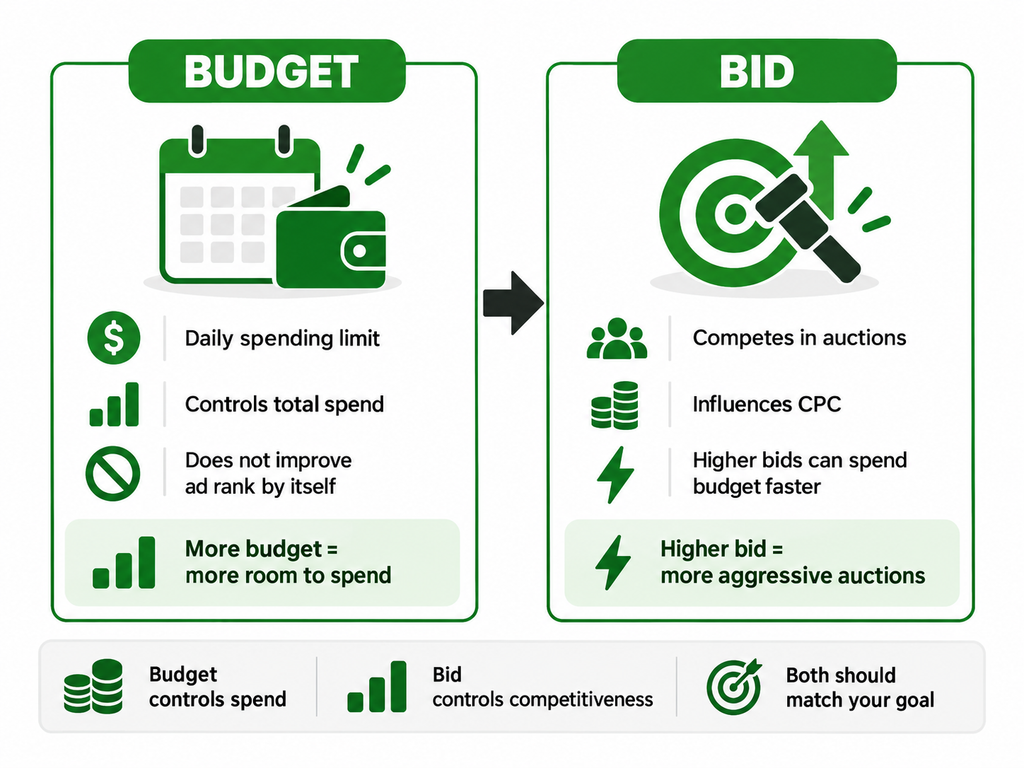
Budget vs Bid: Do Not Confuse the Two
Budget and bidding are both important parts of how Google Ads campaigns operate, but they serve different purposes. It can be confusing, since both settings can affect traffic and spending when you change it. Knowing the difference will allow you to make more informed changes.
1. Bids Influence Auction Competitiveness
Bids determine how aggressively your campaign tries to win ad opportunities. Depending on the bidding strategy, Google may automatically adjust bids to pursue clicks, conversions, or conversion value. Bid higher to win more auctions, but that will also increase your costs. Lower bids could mean fewer chances for your ads to compete.
2. Raising Budget Does Not Automatically Improve Ad Rank
Ad Rank is calculated based on several factors, including bids, ad quality, landing page experience, and auction-time factors. If your campaign lacks impressions because of low ad rank, increasing the daily budget won’t fix the problem. Or maybe you need to improve your ads, landing pages, or bidding strategy.
3. Raising Bids Can Consume Budget Faster
When bids increase, your campaign may become more competitive in certain auctions. But higher click costs can also cause the daily budget to run out sooner. That doesn’t necessarily mean you’ll receive more conversions. Your Google Ads bidding strategy and budget should support the same goal: attracting valuable customers at a cost the business can afford.
The Hidden Costs Businesses Should Include in Their Google Ads Budget
When businesses discuss Google Ads costs, they usually focus on the money paid directly to Google. There are, however, other costs involved in running a successful campaign. Depending on how you have set things up, you may need help with campaign management, tracking, landing pages, or reporting. These costs need to be part of the total investment amount.
Some common expenses include:
- Landing-page development: Creating or updating pages that encourage visitors to inquire or purchase.
- Conversion tracking: Setting up reliable measurement for leads, sales, and other important actions.
- Call tracking: Understanding which advertising activities generate phone inquiries.
- Creative production: Writing advertisement copy or producing images and videos.
- Feed management: Keeping product information accurate for relevant retail campaigns.
- CRM integration: Connecting advertising enquiries with sales and customer records.
- Reporting tools: Reviewing performance and understanding business outcomes.
For example, imagine spending $2,000 on Google Ads and another $500 on management and supporting tools. If that investment brings in 10 new customers, your total acquisition expense would be $250 per customer, before accounting for any other relevant costs. Looking only at the advertising spend would make customer acquisition appear cheaper than it actually is. A realistic paid search budget should reflect the full cost of running and maintaining the campaigns.
Common Google Ads Budget Mistakes Small Businesses Make
Many budget problems begin before the first advertisement goes live. And sometimes companies simply pick a daily amount without considering the costs of keywords, knowing their conversion potential, and calculating what a customer is worth. People are spending more because the traffic looks good but the inquiries are not converting into sales.
Here are some mistakes worth avoiding:
- Picking a budget without estimating CPC: You may not know how much relevant traffic your money can buy.
- Using the same budget in every industry: Advertising costs and customer values differ between markets.
- Expecting immediate profitability from a tiny test: A small amount of data rarely tells the full story.
- Spreading limited spend across too many campaigns: Individual campaigns may receive too little traffic to evaluate.
- Increasing budget before fixing search terms: More money may be spent on irrelevant searches.
- Ignoring lead quality: A large number of inquiries doesn’t guarantee valuable customers.
- Treating all conversions as equally valuable: A minor interaction isn’t necessarily worth the same as a qualified lead.
- Following Google budget recommendations automatically: Suggested increases should still be checked against business results.
- Changing budgets too frequently: Constant adjustments make it harder to understand performance.
- Judging campaigns from only a few days of data: Short-term changes may not represent a meaningful trend.
These mistakes are usually the result of treating the budget as a separate setting rather than as part of an overall advertising strategy. Better decisions come from knowing what your customers value, tracking the results that matter, and allowing campaigns enough time to give up useful information.
A Practical Google Ads Budget Planning Framework
Building a practical Google Ads budget is not about having a complex financial model. A simple process can help you understand what you are trying to achieve, what customers are worth, and how much traffic you will need. This is how it should be done.
Step 1 – Define the Business Goal
Begin with a clear picture of what success means. “Do you want more qualified inquiries, appointment bookings, online purchases, or paying customers?”
Set a realistic monthly target based on your business goals and how many new customers you can take on. This will provide the campaign with a clear goal from the outset.
Step 2 – Calculate Customer Value
Calculate average revenue per customer. Calculate gross profit after direct costs. Consider the value of customers over a longer time horizon who come back or keep paying for the services. The aim is to calculate the value of a new customer to the business.
Step 3 – Set an Affordable CPA
Calculate what you can afford to spend on a customer and still hit your profit goals. 2. Margins, operating expenses, and cost of sales are included. If your campaigns are lead-based and not sale-based, use your close rate to figure out an acceptable cost per qualified lead.
Step 4 – Estimate CPC and Conversion Rate
Find out the likely cost of the relevant clicks. Google Ads Keyword Planner provides estimates, but historical campaign data can show you what you’ve actually experienced. Then, estimate how many clicks could result in meaningful conversions. If you’re starting a new campaign, make conservative assumptions rather than the best-case scenario.
Step 5 – Calculate Required Clicks
Once you know the target number of leads and expected conversion rate, calculate the traffic needed. For example, if you want 20 leads and expect 5% of visitors to convert:
20 ÷ 5% = 400 clicks
This gives you an estimate of the traffic required to support the goal.
Step 6 – Set the Monthly Budget
Multiply estimated clicks by expected CPC. Then compare that to what the business can comfortably afford. If that required budget is too high, go back to the lead target, targeting strategy, or conversion assumptions. It’s better to adapt the plan to reality than to promise to spend what the business cannot afford.
Step 7 – Allocate Budget to High-Intent Areas
Focus your efforts on the campaigns and keywords that are closest to the actions of valuable customers. Don’t just spread the budget evenly over everything for no reason. Some services may have better profit or lead quality and may deserve more attention.
Step 8 – Scale Gradually
If the performance is consistently profitable, then look to increase your spend. Check for additional demand, and if acquisition costs are still reasonable. Make limited changes and check the results before increasing the budget again. This gives you more control over growth.
Final Thoughts
You don’t need a massive Google Ads budget to compete as a small business, but you do need a plan that reflects your market and financial objectives. Advertising costs can vary greatly by industry, location, and service. If a monthly amount is chosen without regard to click costs, conversion rates, or customer value, a campaign might find it difficult to gather enough data. But throwing money at it isn’t necessarily going to guarantee better results. The budget should give your advertisements a reasonable opportunity to reach potential customers while remaining manageable.
The best place to begin is with your goals for the business. Know what a customer is worth. Calculate how many clicks you need. Know what you can afford for each conversion. If a campaign is delivering qualified leads or sales at an acceptable cost, then it’s worth spending more. Until then, improving targeting, tracking, and website performance can often make a bigger difference than raising the budget.
Are your Google Ads delivering enough value for the budget you’re spending?
Work with Ashwani Kumar Sharma to evaluate campaign costs, search terms, conversion tracking, and lead quality, helping you identify where your advertising strategy can be refined for stronger, more meaningful results.
Frequently Asked Questions
Question: How much should a small business spend on Google Ads per month?
Answer: There isn’t a set monthly figure that works for every business. You’ll need to factor in your average cost per click, conversion rate, customer value, and sales targets into your budget. First, estimate how much traffic you will need to generate worthwhile inquiries. So, then estimate the likely spending and decide whether it is available for your business.
Question: What is a good starting Google Ads budget?
Answer: A good starting budget is one that you can comfortably maintain and generate enough relevant traffic to assess performance. Research some expected CPCs and make a guess as to how many clicks you will need for a useful test. Don’t choose such a small amount that you can’t learn whether the campaign is bringing in potential customers.
Question: Can I run Google Ads with a very small budget?
Answer: Yes, you can run Google Ads on a low budget, but the results might be limited. If the keywords are expensive, you will get fewer clicks, and testing will be slower. Concentrate on relevant searches, manageable locations, and accurate tracking. Give your campaign enough time to gather useful performance data.
Question: How does Google calculate monthly ad spend?
Answer: For most campaigns, Google calculates your monthly spending limit by multiplying your average daily budget by 30.4. At a daily budget of $20, your monthly budget will be $608. Your actual spend can vary from day to day, so you may not see the exact same amount charged each day.
Question: Should I increase my budget when Google says “Limited by budget”?
Answer: Not necessarily. “Limited by budget” means your campaign may be missing opportunities because its daily budget is too low. However, you should first check conversions, cost per lead, and lead quality. If the campaign is generating profitable results, increasing the budget gradually may help. If performance is poor, improve targeting, keywords, and bidding before spending more.